How to embed twitter in your event

8 comments so far Free RSS Subscription Free Email Subscription

Photo by: luc legay

The latest posts have talked extensively on how it is increasingly important to integrate twitter in events. This post answers the whys and hows.

I was recently at ad:tech London and complained on how they did not integrate twitter during the event, although a lot of people attending the event were twitting about it. Last weekend I attended BarCampLondon5 and @cyberdees and @cianw, members of the eBay organization, showed me how to embed the service.

What is twitter?

Why you need to integrate twitter in your event?

- Creating @eventname will help you in communicating with your attendees and collect early feedback about your choices
- Using @eventname to talk about the event will help in actually promoting the event in the community and get more sponsors
- Telling people to use #eventname will help to group the talks about your event under one tag. Hashtag as well as @eventtrack aggregate events by #eventname. It will be then easy to track discussion, feedback and user experience.
- Live twitting, the ability to see on one screen the live twits during an event, helps twitterers to recognize themselves and network more efficiently.

How do you integrate twitter in your event?

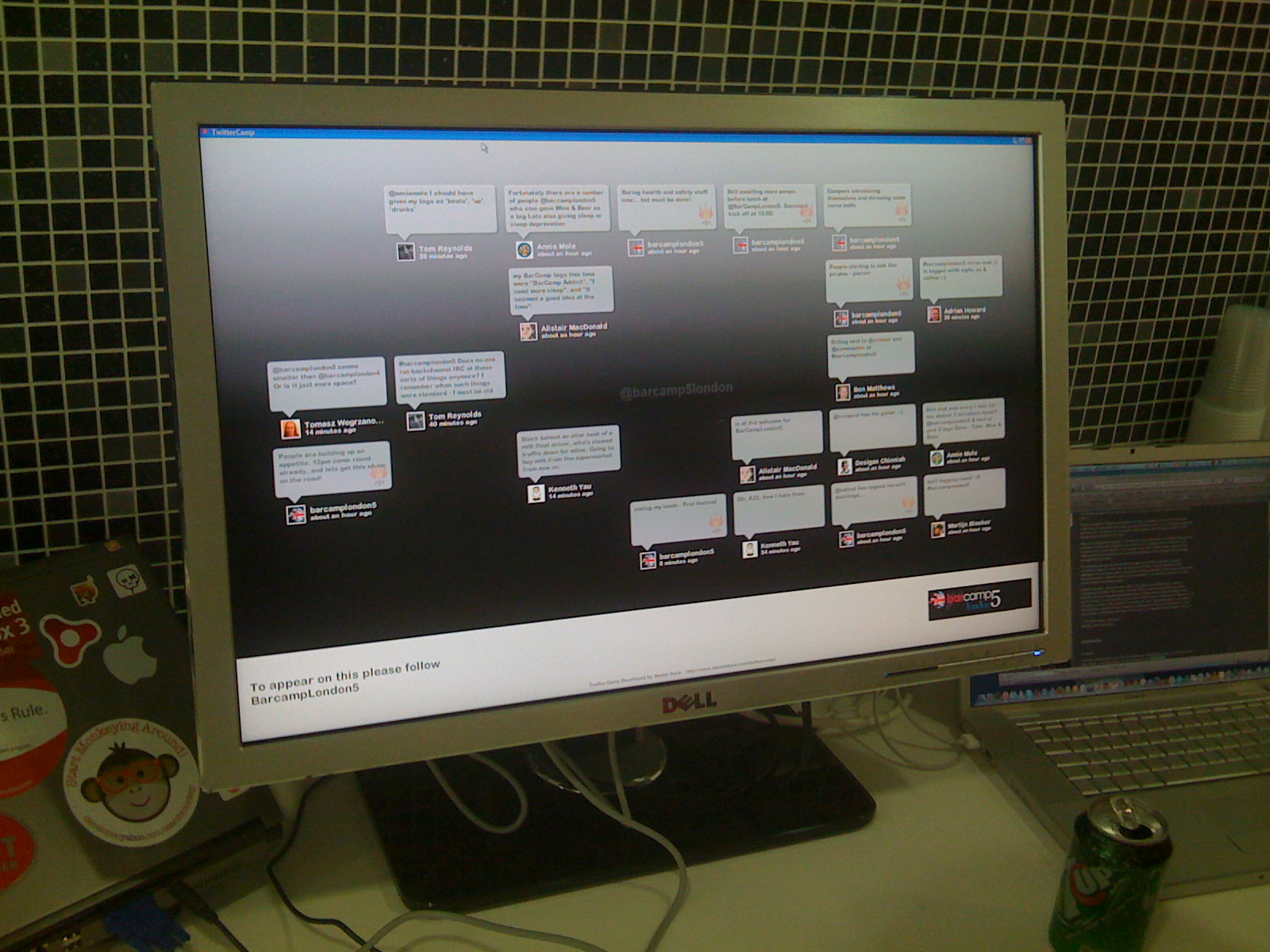
- Use a large monitor connected to a computer
- Download Adobe AIr and TwitterCamp
- Make sure that the screen can be read easily by attendees

This is how they did it at BarCampLondon5
Comments and suggestions

Have you used twitter at your event? Then please share your experience.



Categories: Julius Solaris, event management, event planning 2.0, project management, software, tips, twitter


Free RSS Subscription

Free Email Subscription

Related Posts

8 Responses to “How to embed twitter in your event”

  1. Posted by 140Char » Using Twitter in a live setting.

    [...] Apologies for a slight lack of posting due to other commitments. But on the bright side, there’s a good post on Event Manager Blog about ‘How to embed twitter in your event’ [...]

  2. Posted by PM Hut

    It’s amazing to see that twitter’s uses are nearly endless. It’s also interesting that no real competitor is up for the challenge yet (except for one only targeted for corporate clients, and charges money for the service)…

    PM Huts last blog post..Evaluating CMMI for Quality Project Management: When is it a Good Fit?

  3. Posted by Julius

    @PM Hut -

    Plurk made it for a while and Friendfeed is there as well but the spirit of the community is great

  4. Posted by Free is the new black | Event Manager Blog

    [...] you use social media and social networks, if you know what twitter is, if you integrate sponsors gently and wisely, you will definitely find new ways to engage and [...]

  5. Posted by 25 signs your event SUCKS! | Event Manager Blog

    [...] did not set up twitter hashtags for the event or did not communicated them to your [...]

  6. Posted by Aric Hoek

    I do nto have a very big group, so I am not sure how effective it will be. None the less, I have downloaded Air and Twitter Camp and I love it!

    I want to find a way to put it on the wall of my studio for every day use.

    Perhaps I can use it as a form of testimonials for new clients to read?!?!

  7. Posted by Julius

    wow slick ideas! let us know how it goes and stay tunes as I’ll be soon be posting about the topic again

  8. Posted by sportnews

    Amazing
    http://sportsnews247.blogspot.com/